
Getting Started with LegoCity
Welcome to LegoCity! This guide will help you get up and running quickly.
What is LegoCity?
LegoCity is a Smart City Builder that provides a reusable foundation for building city dashboards and applications on top of FIWARE / NGSI-LD and modern web technologies.
Key Features
- 🏙️ Smart City Ready - Built on FIWARE/NGSI-LD standards
- 🗺️ Interactive Maps - Powered by Mapbox GL JS
- 📊 Flexible Dashboard - Configure with PayloadCMS
- 🔌 Extensible - Plugin architecture for custom features
- 🤖 AI-Powered - Optional AI assistance for content creation
- 🌍 Multi-tenant - Reusable across different cities
Core Components
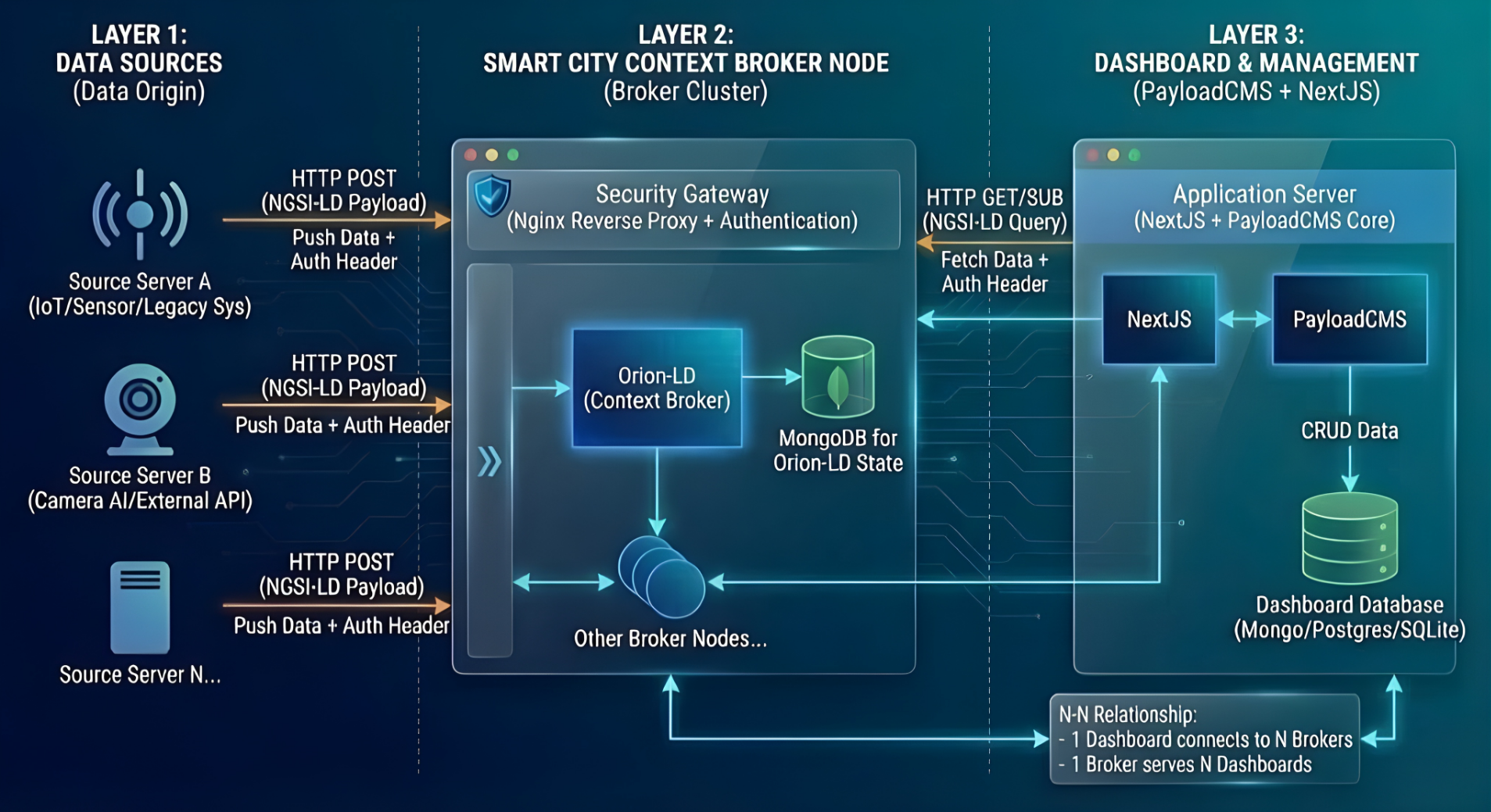
LegoCity's 3-layer architecture: Data Sources, Smart City Context Broker, and Dashboard Management
Quick Start
Prerequisites
Before you begin, ensure you have:
- Node.js 18.x or later
- pnpm 8.x or later (package manager)
- MongoDB 6.x or later
- Git for version control
Installation Steps
Clone the repository
bashgit clone https://github.com/CTU-SematX/LegoCity.git cd LegoCity/dashboardInstall dependencies
bashpnpm installConfigure environment
bashcp .env.example .envEdit
.envand set:bashDATABASE_URI=mongodb://127.0.0.1/legocity PAYLOAD_SECRET=your-secret-key-here NEXT_PUBLIC_SERVER_URL=http://localhost:3000Start development server
bashpnpm devAccess the dashboard
- Dashboard: http://localhost:3000
- Admin Panel: http://localhost:3000/admin
Next Steps
After completing the quick start:
- Complete Installation Guide - Detailed setup instructions
- User Guide - Learn how to use LegoCity
- Configuration - Configure data sources and APIs
- Development Guide - Start building custom features
Architecture Overview
LegoCity is built on three main layers:
1. Context & Data Layer (FIWARE)
- NGSI-LD context brokers
- Smart Data Models
- Real-time sensor data
2. UI Layer (Next.js + PayloadCMS)
- Interactive map views (Mapbox)
- Dynamic dashboard configuration
- Content management
3. Integration Layer
- API proxies and security
- AI assistants (optional)
- External services
Community & Support
- 📖 Documentation: https://ctu-sematx.github.io/LegoCity
- 🐛 Issues: GitHub Issues
- 💬 Discussions: GitHub Discussions
- 📧 Contact: CTU-SematX Team
Design Principles
Context-Centric Design
City information is modeled as NGSI-LD entities in context brokers - the single source of truth.
Configuration-Driven UI
Dashboards are constructed from configurable blocks in PayloadCMS, not hard-coded.
Reusability
The same codebase works across multiple cities by changing configuration, not code.
AI as Optional
LegoCity works fully without AI. AI integration is a secondary feature for content authoring.
Ready to dive deeper? Continue to the Installation Guide for detailed setup instructions.